Integrating HUD Element settings in a resource pack
First of all there's a template here, download it so you can start from default values and with the structure already defined.
You can edit all elements individually split in their own files.
Since this is a resource pack any missing files will be ignored, therefore files you wish not to change should be deleted so other resource packs that alter them can do so without having to rearrange the resource packs order.
In order to tweak it open the file you want to edit (let's assume it's the command menu so open cm.json). There you'll find a data structure with the following elements:
- Anchor: Important to set this to the closest part of the screen where it will display, it's used for compatibility to avoid issues when resizing / going between different resolutions and aspect ratios, possible values are:
- TOP_LEFT, TOP_CENTER, TOP_RIGHT
- CENTER_LEFT, CENTER, CENTER_RIGHT
- BOTTOM_LEFT, BOTTOM_CENTER, BOTTOM_RIGHT
- xPos: The x position relative to the anchor point
- yPos: The y position relative to the anchor point
- width: The width of the element, usually it shouldn't be modified but we offer the option in case you change the texture size itself so it can fit better.
- height: same as the previous one but vertically
- xScale: scale that will expand in the horizontal plane.
- yScale: scale that will expand in the vertical plane.
- rotation: the rotation in degrees
In order to get the data needed to populate the .json file you can obtain it from the game, in the M menu > Config > Adjust HUD, then position the element you want and you'll see the information in the middle of the screen: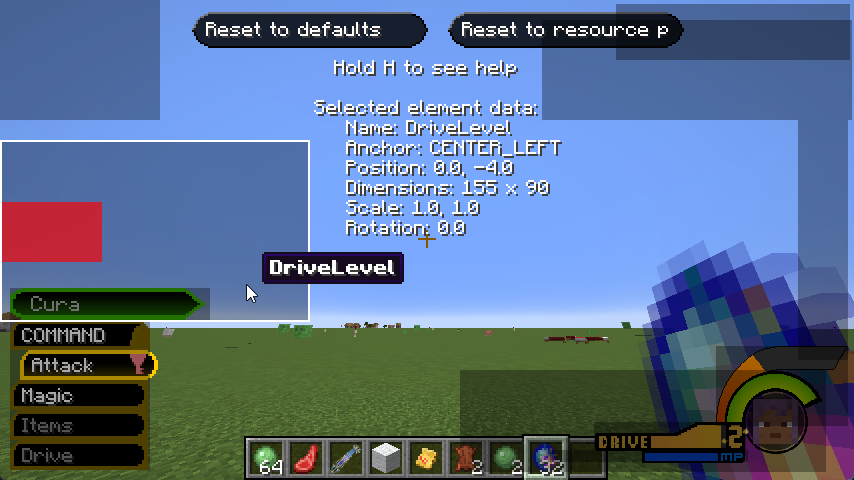
Some elements like CM and HP can have extra options which once set to resource pack defaults will override your config values
-
CM:
- classicColors: Makes the color switching like in KH1 where it was Blue (out of combat) and red (in combat) compared to KH2's yellow color in combat and red only for bosses.
- selectedXOffset: Sets the X offset of the selected option in the Command Menu
- submenuXOffset: Sets the X offset of the submenu so it opens more to the right (or less)
- headerTitle: Shows COMMANDS in the header, can be disabled if you edit the Command Menu Header to add it through texture
- textXOffset: Sets the X offset of the text in the slots.
-
HP:
- showHearts: Displays or hides the vanilla hearts HP bar
- lowHPAlarm: Sets the volume of the low HP alarm from 0 (disabled) to 10
-
LOCKON:
- lockOnIconScale: Sets the scale of the lock on icon (used with the HardLock only)
- lockOnIconRotationSpeed: Sets the speed which the lock on reticle spins
- hpPerBar: Sets the amount of HP which constitute a whole bar
-
PARTY:
- distance: Sets the distance between party members, so in case you change the config to allow more than 5 members in a party they can fit better.